Tag Archives: nutanix

Upgrading ESXi on Nutanix by CLI

Firstly, you MUST check requirements for any changes as per your Nutanix hardware model and what the Nutanix upgrade guide (for the version you are using) says to check.

The advantage of the Nutanix platform is that even when the local controller VM (CVM) is offline, the Nutanix NFS datastore is still visible to the host on which that CVM resides.

The below is just for the upgrading ESXi part. If you also need to upgrade the Nutanix NOS software version, consult the appropriate Nutanix Upgrade guide.

  1. Download the vSphere depot zip file (offline bundle) from vmware.com
  2. Put it on the NTNX NFS datastore (Here it is named : NFS1)
  3. Shut down the CVM on the node you want to upgrade, make sure all guest VMs are off or migrated off that host. “ha.py” will kick in so the NFS is still visible on that host despite the CVM being off.
  4. Upgrade the host by doing the following (example below is upgrading to 5.1u1):To get the “profile” name, SSH to a host and run:esxcli software sources profile list -d=[NFS1]update-from-esxi5.1-5.1_update01.zipand use the ‘standard’ name for the upgrade commandlet below.
  5. Run the upgrade on the ESXi host:esxcli software profile update --depot=[NFS1]update-from-esxi5.1-5.1_update01.zip --profile=ESXi-5.1.0-20130402001-standard…wait about 30 seconds or so for the upgrade to complete. A whole lot of garbage fills the screen about vibs etc. Scroll up a bit and it says “reboot required” or similar.
  6. Reboot the host and it should be upgraded. Once the host restarts, the CVM will power on and then re-join the Nutanix cluster. Make sure you check all is ok with a cluster status on any CVM before repeating the above procedure on the next ESXi host.

Do the same sort of thing for ESXi 5.5 upgrades of course – change the filenames/depot files/profile name as appropriate. Remember to fully check your hardware model and other Nutanix specific requirements from the upgrade guide steps before kicking off the upgrade or things may end badly for you :)

The Nutanix support team is happy to walk you through the above as well.

The Boiled Frog in Enterprise IT

Ask yourself when the last time you went to www.google.com and the search results were “slow”. Indeed, have you noticed any real slowness over the last say 10 years?

I haven’t. Obviously the number of indexed web pages has gone from say 1 billion to well over a trillion in that time but the end user is still presented with search results as fast as ever (if not faster!). Scale is not a problem for Google.

Now look at your own Data Centre. I bet over the same period of time you’ve experienced growth and therefore scaling issues, especially with regard to compute and storage resources. Lots of money spent – possibly different vendors over that time and millions of dollars spent, users complain of ‘slowness’ and the infrastructure gets blamed….and you realise these issues are not going away anytime soon!

So why can Google get it right but Enterprises continue to struggle with this fundamental problem?

I could be flippant and say that the traditional storage vendors (I’ll pick on them due to the massive costs they impose on Enterprises) have no interest in improving the situation. Sure, they can say they will add Flash drives (PCIe or SSD based) to their arrays and the performance of their arrays would no doubt improve, but this is the same old dance you’ve done before (and of course they’ll charge you for it). The real problem is that the old architecture is being re-sold to you each time, so it the same problem will always reappear a few years down the track.

When your new flash array fills up or the controller hits it’s limit then you have to repeat the process again and get newer drives or more capacity controllers (forklift upgrade!)…..and the storage vendors love it don’t they! More of your cash on hardware and on professional services. The poor old Enterprise IT Manager has been the frog that has been boiled slowly over the years. Spending a LOT of money with your storage vendor has somehow become the norm and expected.

Remember too that even if you upgrade your array, your servers (compute) are still separated from it via a network of some kind. Reads and writes have to go over this network. To quote an old adage from the network world “It’s the latency, stupid!”. Latency kills performance. That will never change. So the only real thing you can do is to minimize it. So, not only do you have a latency issue, you also have to re-buy servers too when the time comes.

It does not have to be like this.

Google overcomes the latency issue by moving the storage and compute to the same ‘layer’. They ‘converged’ the compute and storage – essentially eliminating the network latency between those components. Clever. Then they scaled. Done.

Ask yourself why web players like Google don’t bother with SAN arrays. To put it simply they could see a long time ago that the above limitations and failings of that architecture. The scaling problems and cost implications were obvious too.

With regard to your own Data Centre – do you want your Data Centre to continue to look like 1990s technology like this?
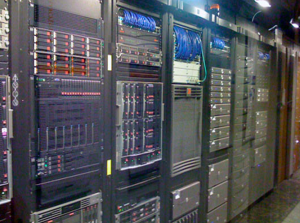
olddc1

…Or would you like it to look something along the lines of a Google-like Data Centre?

googledc

 [Source: http://www.google.com/about/datacenters/gallery/#/tech]

Google had some very smart little vegemites working for them to come up with a file system that could scale to whatever they needed….and they did it well. To make it work for them they had to write their own custom applications to work on the infinitely scalable file system they created.

Of course, your own Enterprise apps within the Data Centre are not able to be re-written – but there is another way to take advantage of this architecture and bring it to the Enterprise and break out of the ‘boiled frog’ paradigm.

Imagine if someone could take the same Google-like idea, run it on commodity x86 servers, use a virtualisation hypervisor which we all know (eg. vSphere), combine all the storage per server in a single (if you want to) NFS datastore which scales infinitely – just keep adding more servers when you need to? Then you could run your apps on it (via your virtual machines) and never have to worry about forklift upgrades ever again.

If you run out of compute, add more nodes. If you ever run out of storage, add more nodes. Because the storage controllers are now in software, they scale as well at the same time…if the controller seems overwhelmed, add more vCPU or vRAM or add another node to share the burden.

Each node (or server) brings more and more resources to the cluster – quickly, easily and at a known cost and performance line. This is what the Enterprise has been waiting for….a system built from the ground up for virtualisation that once in place will scale forever only when you need it. Suddenly, your engineers can not worry about ‘business as usual’ tasks managing a data centre infrastructure and instead can start diverting their brain power to innovate in other areas – your IT department could be viewed as an enabler to the business rather than a cost drain. When you don’t have to worry about how something runs, only then you can improve. You just want to ‘turn a key’ and it ‘goes’.

Suddenly your data centre will start to look like Google and you’ve jumped out of the boiling water.

So, if you are still investing in stand-alone storage arrays in 2013 then you are suffering on two fronts: 1) Re-investing in old 1990s/2000s architecture and 2) missing the performance benefits, cost savings and scalability of converged compute and storage solutions bring.

Also, don’t be fooled by the big vendors pushing their ‘converged’ solutions. If they have any component that is a ‘hardware SAN’, they are simply taking what they sell individually now and trying to sell it to you in a different form factor…bundled with other compute and network items. Remember – if the compute component is in a different part of the ‘rack’ then it isn’t really converged is it?

If it still looks like the old array/data centre photo as above, then it is the same old dog…and you will still be the same old boiled Enterprise IT frog….as I was in my previous IT life before joining Nutanix.

I should point out that individually those old components from the big vendors are fine (as per the old architecture model) – my point is that when they try to shove it all together in one ‘rack’ and try to convince you it is ‘converged’ they are being sneaky and certainly not Google-like.

If you want to differentiate yourself from the competition and take advantage of the Software-Defined Data Centre – or SDDC – (mirroring the Google model) then you really need to look at Nutanix for any virtualisation project (server infrastructure, big data, VDI). By the way, some of those Google smart little vegemites I mentioned …they now work for Nutanix creating the software smarts to make this a reality.

Now in 10 years’ time, you will look back and realise your scaling issues have gone, performance never dropped and you saved money. You became your own Google in your own Data Centre.

Awesome.

Basic configuration of the Nutanix 2RU block

Winter is coming for the old SANThought I’d describe what you get when the shiny new 2RU Nutanix block gets to your door and how to get it configured to a basic level from the point of view as a new user of the Nutanix solution. Obviously, talk to your Nutanix partner before diving in, but this should give you a bit more of an idea on what you need to do to prepare.

In my case the block was comprised of four nodes and I ordered it with 192 GB RAM per node (768 GB total). I won’t go into the tech specs in detail as you can get that from their web site : http://www.nutanix.com/products.html#Specs

The rail kit is a snap-on type, easy to install, but don’t be a goose (like I was) and try to lift/install it into your rack by yourself. It isn’t light as the disks are pre-installed. After a short trip to the emergency room I continued with the config… :)

The next thing I did was send an email to Nutanix support to get registered as a customer when then allows you access to the knowledge base. Within about 10 minutes I had a reply and login to their support portal.  I searched for ‘setup’ and got the setup guide. If you aren’t sure what version to get, contact support – they are very fast to respond. In my case it was v2.6.2 (latest for Oct 2012).

Physical cabling was easy: 2 power cables (carve off to separate UPS power feeds); Each node has 1 x 10GigE network interface and 2 x 1 GigE interfaces for failover of the 10GigE as well one IPMI (lights out management) 1 GigE interface. That’s it. I assigned the IPMI as access ports and the 10Gig and 1Gig uplink-to-network ports as trunks.

The guide itself is pretty straight forward and easy to follow and the easiest method is to use IPv6 to configure the cluster. I used a Win7 laptop with IPv6 enabled, Bonjour for Windows, Google Chrome (with DNSSD extension) and your typical dumb gigabit switch to hook it all up in an isolated environment initially (if you want to isolate it). The cluster uses the 1 gig interfaces as a failover to the 10 gig nics, so that’s why it works on a basic 1 GigE switch. The setup process assigns IPv4 addresses to the cluster components so don’t worry about needing to be an IPv6 guru – you don’t. You don’t have to use Win7, other OS options are ok too. I didn’t try any other OS/browser combo so YMMV.

In my case I’ve assigned a complete /24 subnet in the DC for Nutanix infrastructure. It is recommended that all the components are in the same L2 domain but it is not mandatory. Addresses will be split out between the ESXi hosts, IPMI adapters and Nutanix controller virtual machines. Do not use 192.168.5.x/24 as this is reserved for the cluster’s internal communication.

I reserved addresses in segments so that when I get more Nutanix blocks, the expansion is contiguous. You don’t have to follow my example of course, but here it is:

Block/ Node ID  ESXi host   Controller VM    IPMI interface
Block 1 Node A     10.1.1.21     10.1.1.121          10.1.1.201
Block 1 Node B     10.1.1.22     10.1.1.122          10.1.1.202
Block 1 Node C     10.1.1.23     10.1.1.123          10.1.1.203
Block 1 Node D     10.1.1.24     10.1.1.124          10.1.1.204

As you can see, any future blocks can continue the sequence. eg:

Block 2 Node A     10.1.1.25     10.1.1.125          10.1.1.205  … and so on for any future nodes.

I don’t think I’ll ever have 54 nodes so that sequencing should be ok :) The controller virtual machine is where all the magic happens. There is one of these per node and the key to the whole Nutanix solution is the software and processes that run within the Controller vm; keeping everything in check and optimised; even in the event of failure.

The block ships with evaluation versions of vSphere ESXi hypervisor, vCenter server, Windows 2008 R2 Enterprise (for vCenter), MS SQL 2008 Enterprise (for the vCenter database). You can apply your own licenses as appropriate. Each host has its own local datastore (stored on the SATA SSD) and the distributed NFS datastore is comprised of the FusionIO drive (PCIe SSD) and the SATA disks. There are also ‘diagnostic’ vm’s pre-deployed which are used to benchmark the performance of the cluster.

You do not have to use the vCenter and you can decide to use your pre-existing one (it will save you a license). At this stage I’ll probably keep a separate vCenter for the VDI deployment but that is up to your own individual deployment scenario.

Once the cluster is ‘up’ you can then follow the guide and configure NTP and DNS from the CLI, configure the vMA, configure the cluster and hosts in vCenter, install the VAAI plugin and the NFS storage.

I also added an external non-Nutanix NFS datastore to all ESXi hosts so that I could use it as a transfer mechanism to get vm’s and templates from existing vSphere infrastructure to the Nutanix block should I want to. Note that there is a way to allow external-to-Nutanix ESXi hosts to connect to the internal Nutanix NFS datastore, however I think it is easier and better to keep the only hosts that can write to the Nutanix NFS datastore as the Nutanix nodes themselves.

When you take into account picking up the box from the loading dock, unpacking, lifting/racking, cabling, getting your Win7 laptop ready, cluster and vSphere configuration, DC network configuration, moving from isolated to production, installing the VAAI plugin, configuring NFS storage and final checks I’d say you were looking at a few hours in total to complete. Obviously adding any more blocks will take significantly less time given most of the clustering components are already done.

The ease of configuration and administration of the Nutanix block has been great. The other thing to keep in mind is that the support team from Nutanix (and their partners) can assist you with the above deployment process if you like.

So, at the end, you have a complete storage and compute modular building block that is easy to deploy and scale out when you require. In the coming weeks I’ll provide updates on the experience on using the block for our VDI project, as well as going into some detail on how the block has been designed from the ground up to handle a lot of different failure scenarios.

Be sure to check out some of the Nutanix YouTube videos as well if you haven’t done so: http://www.youtube.com/user/Nutanix and get ready for a life without a SAN in your DC.

The Nutanix box arrives in Australia